



Using RTD to analyze your Wi-Fi Networks and fix slow Wi-Fi

2 min

Recently, I started receiving alerts from Domotz that several devices were coming offline and online every few minutes. After some quick investigating, I realized that all the alerts were associated with devices that were connected to my Wi-Fi network and are located in my living room.

Ah ok… makes sense. I’ve always thought those are devices were a little too far away from my Access Point!

Domotz Round Trip Delay to the rescue
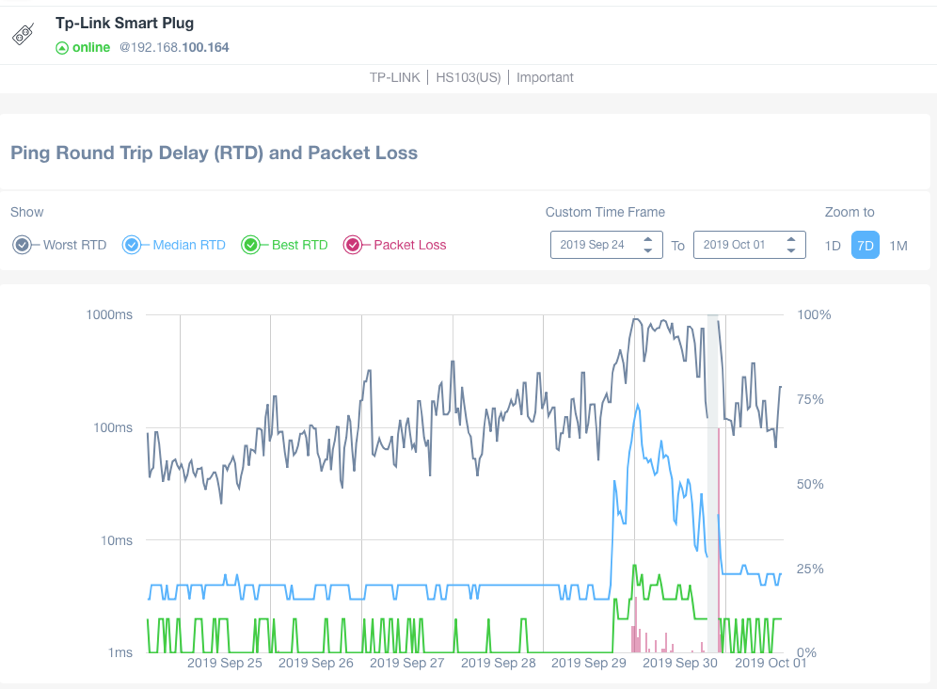
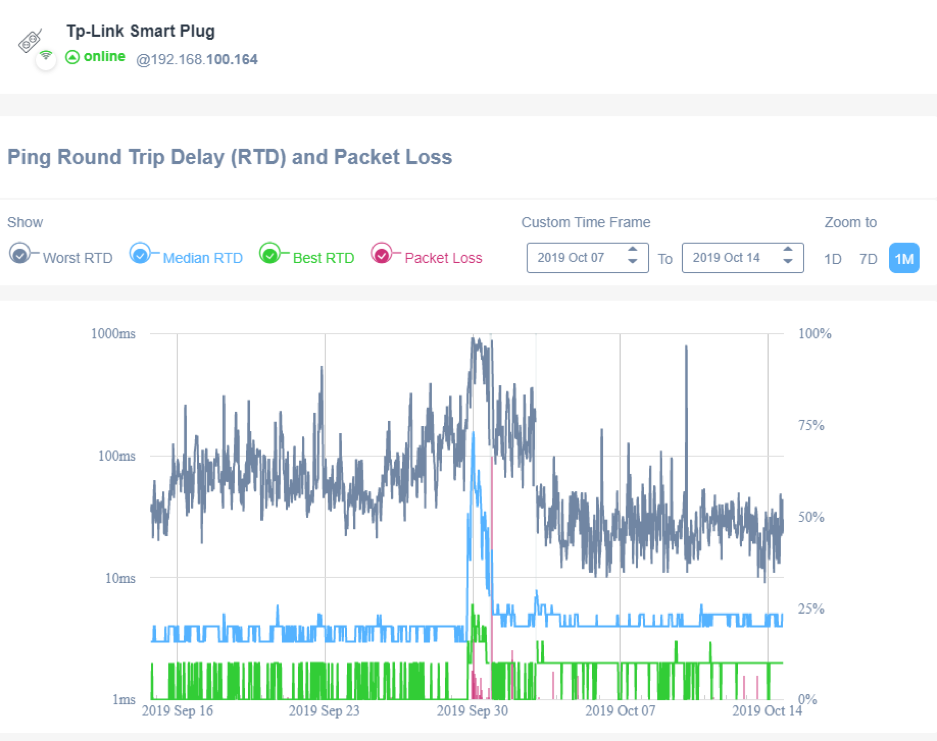
I opened the Domotz app, navigated to a smart plug that’s in my living room and noticed the RTD (Round Trip Delay) charts.

All devices had a higher latency starting on Sunday, even showing packet loss, which was not normal for some of the devices.

How I fixed my offline devices using RTD to analyze the Wi-Fi Network

The next day I changed my Wi-Fi channel and noticed a significant improvement.

On Monday night I checked the network to make sure that I had chosen the Wi-Fi channels correctly. I scanned my network using the Wi-Fi Analyzer and found that a neighbour of mine had overlapped the channels I was using before! Without Domotz I would never have figured that out. This is a huge benefit of Domotz real-time alerts and having the Domotz platform continually monitor the network.

Even after changing channels I decided to take things one step further, hoping I could improve the network even more. That week I added a new, additional AP in the room. Looking back at my Round Trip Delay chart, everything seems to be working much better now:
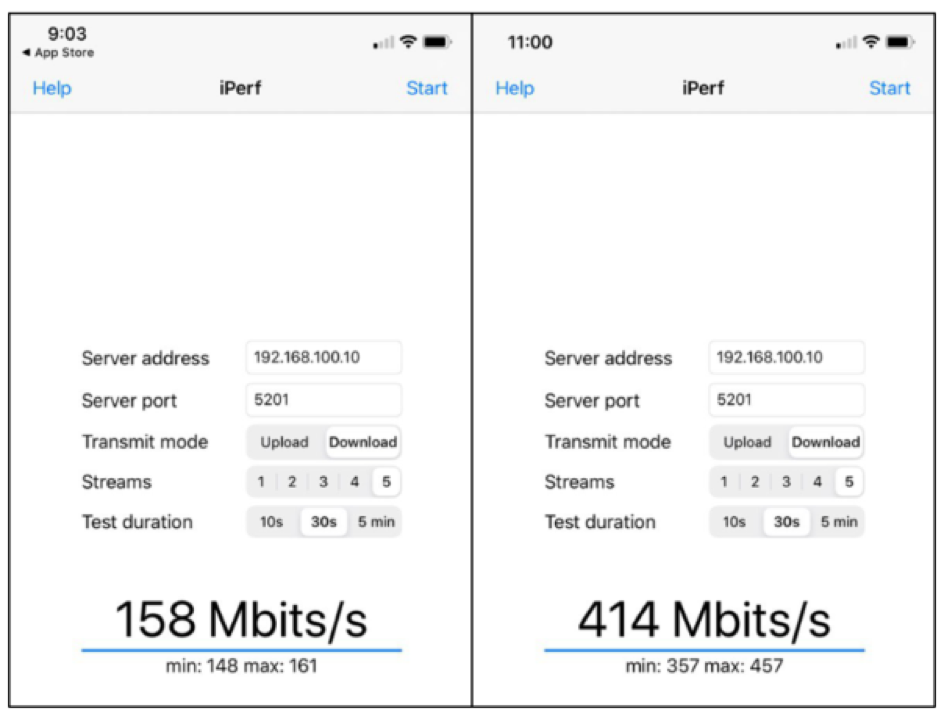
Even the tests with iPerf 3 have improved significantly with the new AP, see here before and after:
Sure, I may be a bit biased as a Domotz employee, this is the amazing value of having Domotz monitor my network and using the Round Trip Delay feature. Without Domotz I would not have seen this issue, and struggled to find a fix!
You might also like…

Read more top posts in this category

Introducing Unified Alerts: A More Consistent, Visible, and Scalable Approach to Alerting 

Introducing Unified Alerts: A More Consistent, Visible, and Scalable Approach to Alerting 

3 minAlerting in distributed IT environments is hard to keep consistent. Different alert types behave differently, configuration is fragmented, and visibility into coverage gets murky as you scale. Unified Alerting is a new framework in Domotz built to fix that — bringing alert rules, severity, history, and device profile management into one consistent system. It is now available as an opt-in beta for existing customers and on by default for new users. Here is what is changing and how to get started.

Top Network Monitoring Protocols for Network Performance

Top Network Monitoring Protocols for Network Performance

13 minNetwork performance problems are protocol problems before they are tool problems. This guide ranks the most important network monitoring protocols in 2026, including SNMP, NetFlow, ICMP, syslog, and WMI, then reviews the top 10 network performance monitoring tools that implement them. Compare Domotz, SolarWinds, PRTG, Auvik, Nagios, Zabbix, and more side by side. Learn which protocols to deploy, which tools support them cleanly, and how to pick the right combination for MSPs, IT teams, and network engineers.

Top Network Security Monitoring Tools for Real-Time Threat Detection

Top Network Security Monitoring Tools for Real-Time Threat Detection

13 minNetwork security monitoring is a stack problem, not a single-tool problem. This guide reviews the top 10 network security monitoring tools for 2026 across five categories: network visibility, vulnerability management, SIEM, next-generation firewalls, and firewall policy management. Compare Domotz, Tenable, Qualys, Rapid7, Splunk, Palo Alto Networks, Fortinet, Check Point, FireMon, and AlgoSec. Learn which tools belong in which layer of a complete security stack and how to sequence them for your environment.

Ready to Get Started?

  • Uncover Network Blind Spots
  • Resolve Issues Faster and Easier
  • Exceed Service Delivery Expectations