
Domotz launches integration with Zendesk Support Ticket Solution
A seamless workflow is critical for MSPs and IT Professionals who aim to provide the best service possible. That’s why we’re excited to announce Domotz’s new integration with Zendesk, the leading support ticket system.
How does it work?
You can connect your Zendesk Account into Domotz. Zendesk will become one of the available Contact Channels available when creating a Shared Alert. This means that you can create or update a Zendesk ticket when a specific event occurs in Domotz.
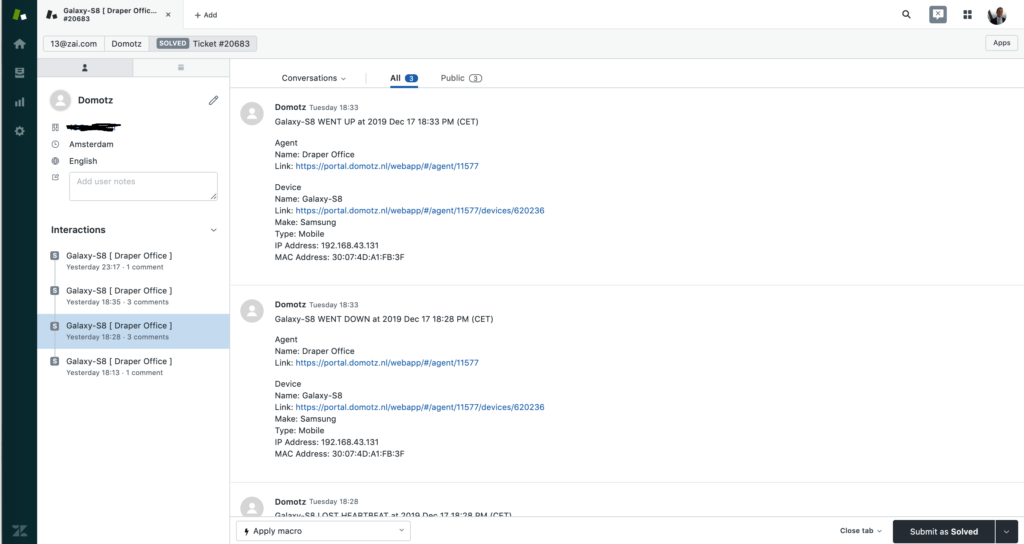
For any specified alert within Domotz a Zendesk service ticket will be created. As events occur on the same network or device, that same ticket is updated by Domotz (only if that ticket is still open in Zendesk). Users can also associate each Agent to one specific Organization so that every time the ticket is automatically created in Zendesk, it flows under that specific Organization.
Tickets created on Zendesk will contain all the needed information. If a device triggers an alert and an open ticket for that device is already present in Zendesk the new event will be appended to the same ticket. When viewing the Zendesk ticket, there is a direct link to the affected device or network to quickly analyze and resolve the issue through Domotz.
This new integration allows teams who are already comfortable using Zendesk to receive alerts in Zendesk.

Helping IT Professionals and MSPs better support their customers
The faster customer support teams can reply to issues, the quicker they can be resolved. By making Domotz alerts immediately available as Zendesk tickets, you’ll leave customers raving at how fast and easy it was to work through a problem – often resolving the issue before the customer even knows about it!

Ready to connect your Zendesk and Domotz accounts?
Learn how to set up the Zendesk integration with our step-by-step guide. (https://domotzpro.tome.host/tc/14062/d/)
You’ll need:
- Zendesk Domain Name
- Zendesk User Name
- Zendesk API Token (how to get it)
Log in to your Domotz Account in the Portal, to get started.
Watch and Learn
Watch this quick video tutorial to see how Domotz integrates with Zendesk for creating Zendesk Tickets with Shared Alerts.
If you have questions about the Zendesk Integration with Domotz or anything else, our award-winning Support Team can give you a hand at: support@domotz.com or chat with us.
Want to learn more about Domotz Integrations? View products, devices, and software that Domotz integrates with to help your team move faster!